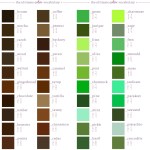
Color Descriptions and CMYK Color Values Infographics.
Looking for ideas for color descriptions? Or maybe CMYK values for the perfect color match? Enerie has 12 infographics for inspiration. I’ll use these infographics for Photoshop. To view high resolution infographics, click on each image.
A few peeps were wondering how I drew attacks in my nuzlocke comic, so I made a quick/kinda sloppy tutorial about it! Tbh it’s just me spamming luminosity and overlay layers haha ;yyy Hope this somewhat helps!
The other day I came across this awesome program by accident
(I don’t even remember what I was actually searching for, but on the several
times I’ve looked for a program like this I’ve had no luck). It’s cool enough that I wanted to share it.
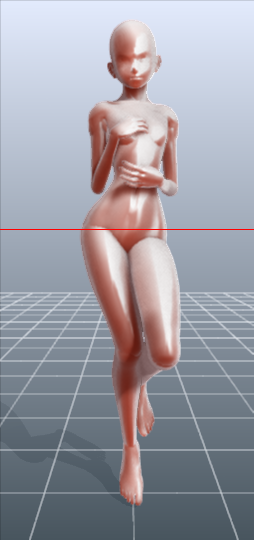
It’s called DesignDoll (website here) and it’s a program that lets you shape and pose a human figure pretty much however you want.
There’s a trial version with no expiration date that can be
downloaded for free, as well as the “pro license” version priced at $79.
I’ve only had the free version for two days so far, so I’m not an expert and I
haven’t figured out all of the features yet, but I’ve got the basics down. The
website’s tutorials are actually pretty helpful for the basics, as well.
Here’s the page for download, which has a list of the
features available in both versions.
There are three features the free version doesn’t have:
Can’t save OBJ files for export
Can’t download models and poses from Doll
Atelier (a sharing site for users; note that the site is in Japanese, though)
It can’t load saved files
The third one means that if you make a pose, save it, and
close the program, you can’t load that
pose/modified model later. You have to start with the default model. I
found that out when I tried to load a file from the day before (this is why
reading is important…). Whether saving your modifications (and downloading models and poses) is worth $80 is up to you.
But, the default
model is pretty nice and honestly if all you’re looking for is a basic pose reference
it should work fairly well as it is. Here’s what it looks like:
There’s a pose tag
that lets you drag each joint into place and rotate body parts. The torso and
waist can be twisted separately, and it seems like everything pretty much
follows the range of movement it would have on an actual human.
Even
the entire shoulder area is actually movable along with the joint! See,
like how the scapular area of the back raises with the arm:
The morphing tag
is one of the coolest features, in my opinion. It lets you pick and
choose from
a library of pre-set forms for the head, chest, arms, legs, etc. It has
some more realistic body shapes in addition to more anime-like ones.
Don’t like the
options there? Mix a few to get what you want! Each option has a slider
that
lets you blend as much or as little as you want into the design.
So you, too, can create beautiful things like kawaii
Muscle-chan!!
The scale tag
lets you mess with the proportions and connection points of different
joints. This
feature combined with the morphing feature not only allows more body
shape
variations, but it also means that you can do things like make a more
digitigrade
model if you want. (The feet only have an ankle joint, but for regular
human poses that’s all that you really need, so whatever.)
Or you can make a weird chubby alien-like thing with giant
hands and balloon tiddies if that’s more your thing.
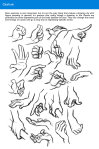
The ability to pose
hands to the extent it allows is far more than I could have hoped for from
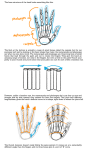
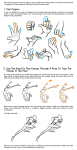
a free program. Seriously, you can change the position of each finger joint individually, as well as how spread out the fingers are from each other. Each crease on the diagram below is a point of movement, and the circles are for spread between fingers.
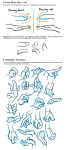
And to make it a bit more convenient, there’s a library of pre-set hand poses you can pick from as well, and then change the pose from that if you like.
In both versions, you can also import OBJ files from other places for the model to hold, like if you wanted to have them hold a sword or something.
Basically, this program is awesome and free and you should
totally check it out if you want a good program for creating pose references.
I’ve said this to my non-techie friends countless times. It’s no secret that being able to code makes you a better job applicant, and a better entrepreneur. Hell, one techie taught a homeless man to code and now that man is making his first mobile application.
(note: yes I realize that 3/5 of those links were Google projects)
But most folks are intimidated by coding. And it does seem intimidating at first. But peel away the obscurity and the difficulty, and you start to learn that coding, at least at its basic level, is a very manageable, learnable skill.
There are a lot of resources out there to teach you. I’ve found a couple to be particularly successful. Here’s my list of resources for learning to code, sorted by difficulty:
Novice
Never written a line of code before? No worries. Just visit one of these fine resources and follow their high-level tutorials. You won’t get into the nitty-gritty, but don’t worry about it for now:
w3 Tutorials (start at HTML on the left sidebar and work your way down)
Intermediate
Now that you’ve gone through a handful of basic tutorials, it’s time to learn the fundamentals of actual, real-life coding problems. I’ve found these resources to be solid:
If you’re here, you’re capable of building things. You know the primitives. You know the logic control statements. You’re ready to start making real stuff take shape. Here are some different types of resources to turn you from someone who knows how to code, into a full-fledged programmer.
Programming problems
Sometimes, the challenges in programming aren’t how to make a language do a task, but just how to do the task in general. Like how to find an item in a very large, sorted list, without checking each element. Here are some resources for those types of problems
If you learned Python, Django is an amazing platform for creating quick-and-easy web applications. I’d highly suggest the tutorial – it’s one of the best I’ve ever used, and you have a web app up and running in less than an hour.
I’ve never used Rails, but it’s a very popular and powerful framework for creating web applications using Ruby. I’d suggest going through their guide to start getting down-and-dirty with Rails development.
If you know PHP, there’s an ocean of good stuff out there for you to learn how to make a full-fledged web application. Frameworks do a lot of work for you, and provide quick and easy guides to get up and running. I’d suggest the following:
If there’s one point I wanted to get across, it’s that it is easier than ever to learn to code. There are resources on every corner of the internet for potential programmers, and the benefits of learning even just the basics are monumental.
If you know of any additional, great resources that aren’t listed here, please feel free to tweet them to me @boomeyer.
Best of luck!
This. Codeacademy is what my class used as supplement. At the very least, learn how to put together a minimalist website. It’s a great skill to have.
(see, I DID do something for 200 followers. 12 followers late, but it’s something! owo”)
All music here is free to use in your games or other projects without charge, either operating on a “Ok to use as long as you give me credit” basis, a Creative Commons License, or is already in the public domain (meaning there’s no copyright on it).
For more information on Creative Commons License works, check here. For an easy to look at graph, check here. Remember, if it’s Public Domain, it’s free to use & redistribute to your heart’s content.
And feel free to add on more resources to this post if you like. c:
———————————————————————————————————
➤ Free Collections Ready for Download
———————————————————————————————————
(don’t worry, it’s not all yume nikki in here! Keep reading!)
Plasterbrain’s Yume Freebie Collection – plasterbrain’s Yume Nikki Fangame Sound dump. According to them, they’re ok with you using it for any type of projects as long as you don’t redistribute the pack for money. Check out their sound cloud. They also did music for DREAM VS DREAM, a Yume Nikki fighting game you can play here. Music loops.
Yume Nikki Fangame Month – bwarch’s pay-if-you-want-it-would-be-really-nice-if-you-did-but-it’s-fine-if-you-don’t pack of free to use Yume Nikki Fangame music for your Yume Nikki fan game (I did the art for it!). Has a bunch of rad tracks for you to use! Check out his Bandcamp here, his Soundcloud here, and his Youtube here. Music loops.
Rindre’s Effect Sounds – A few Sound Effects for your Yume Nikki game by our friend pakilusin! Sound effects. She’s working on an upcoming fan game called Redux, formerly the game Flux.
RPG Maker.net’s Music Pack – RPG Maker.net’s form got together and put out a wonderful album full of RPG Music for you to use. Music & loops.
Noyemi K’s Game Placeholder Pack – A pack by noyemik that includes music & chipsets to use as a PLLACEHOLDER for your game. She has some free to use for her game right down here…
Freesound.org – Check the licensing agreement on the things you download! Sound Effects and Music Loops. You’ll need an account before you download anything, but the library is just so vast that it’s well worth it.
Looperman – Focuses on loops for audio software (so if you want to add more to it feel free). Here’s their terms & conditions page. You also have to create an account before you download anything. Loops, samples, sound effects, acapellas, & raps.
Sound Bible – Royalty-free Sound Effects under the public domain & attribution creative commons license.
Media College – has like, 10 loops in the public domain for you to download.
Free SFX – I linked to their License Page because it’s a bit hidden. Free Sound Effects. Yes, you have to make an account, but it’s free.
JWinter Music – A blog that post free to use Music, mostly for youtube videos.
Indie Game Music.com – Specifically for indie games. Music on the site is under three different licenses, so check this page before you go off downloading things. Loops & Music.
FreePD.com – All of it is in the public domain (everything’s free to use because the copyright expired/there was no copyright in the first place). Loops.
Media Collage – Free Sound Effects as long as you don’t sell them yourself.
SampleSwap.org -“You must Log in (or register) in order to download these samples.… 100% of the samples on this site are free, but registration helps us fight MP3 robots and establish controls over how much gets downloaded, and when.” Samples, Music & Noise Loops, & sound effects.
Dig.CCMixter.org Check each track for a money symbol next to it. If there is none, it’s free to download. Free music.
Incompetech – All music is under creative commons, made by one dude. It’s a LOT of music, & is separated by different genres if you want to search for things.
iBeats – for when you need looping beats for your music. Remember, check the license (some are public domain, some are under commercial use under attribution, and most under a non-commercial license).
FreeMusicArchive.org – most works are under the Creative Commons license. Music & Spoken Word downloads.
Free Loops – Mostly Free Loops & VST Plug ins. Like so many others, check the license before downloading.
Musopen – Aims to be the largest public domain music collection. Go ahead and check if the recording itself as well as the composition is in public domain. Most recordings are. The site offers Classical Music Downloads, as well as Sheet Music.
Japanese Sites
Vita Chi – Free to use for both commercial & non-commercial projects! Music, Screams, & Sound Effects. Mad Father has
PianosDauGe.org – I’m pretty sure it’s free for both commercial and non-commercial use, as long as you don’t redistribute. A bunch of Music Loops. Check out the private policy (in Japanese) here.
Classical Masterpiece Sound Library – Need free classical music and fast? Shazam! Free to use commercially and non-commecially. Alice Mare & The Crooked Manused this site for their classical pieces.
Pocket Sound – Free to use Sound Effects! “This license lets others distribute, remix, tweak, and build upon a work, even commercially, as long as you credit them for the original creation.”
Tami Music Factory – Free to use commercially & non commercially. Check out the copyright page here. Sound effects, loops (Midi & Ogg), and… uh, mobile ringtones if you’re in need of those 0w0”.
Amacha Music – According to the FAQ, it’s free for both commercial and non-commecial use. Music.
H/MIX GALLERY – free background music/loops made by Hirokazu Akiyama. Free for non commercial use only though, you’ll have to pay for a license if you want to use it commercially. Mad Father, the Crooked Man, The Witch’s House, Alice Mare,
Otonomori – According to Rindere, it’s a free to use sound effects website for commercial and non-commercial uses.
Presence of Music – I’m pretty sure it’s just for non-commecial use only. Has music for both standard RPGs & Horror RPGs. Loops, I believe. Ib & the Witch’s House both have music from this site.
*Asterisk* – Free to use Midi files & Web music. Credit is not necessary, but appreciated.
koukaongen.com – Free to use sound effects, music, & loops. Credit is nice, but you don’t need to link back to them. I’m pretty sure it’s noncommercial use only. One of the sites used by the creator of Ib.
Music Material – I’m not too sure what the copyright page says but you can look at it here. Music.







 Ananke's Stuff